👁️ Agent Reach
Give your AI Agent one-click access to the entire internet



Quick Start · 中文 · Platforms · Philosophy
---
## Why Agent Reach?
AI Agents can already access the internet — but "can go online" is barely the start.
The most valuable information lives across social and niche platforms: Twitter discussions, Reddit feedback, YouTube tutorials, XiaoHongShu reviews, Bilibili videos, GitHub activity… **These are where information density is highest**, but each platform has its own barriers:
| Pain Point | Reality |
|------------|---------|
| Twitter API | Pay-per-use, moderate usage ~$215/month |
| Reddit | Server IPs get 403'd |
| XiaoHongShu | Login required to browse |
| Bilibili | Blocks overseas/server IPs |
To connect your Agent to these platforms, you'd have to find tools, install dependencies, and debug configs — one by one.
**Agent Reach turns this into one command:**
```
Install Agent Reach: https://raw.githubusercontent.com/Panniantong/agent-reach/main/docs/install.md
```
Copy that to your Agent. A few minutes later, it can read tweets, search Reddit, and watch Bilibili.
**Already installed? Update in one command:**
```
Update Agent Reach: https://raw.githubusercontent.com/Panniantong/agent-reach/main/docs/update.md
```
### ✅ Before you start, you might want to know
| | |
|---|---|
| 💰 **Completely free** | All tools are open source, all APIs are free. The only possible cost is a server proxy ($1/month) — local computers don't need one |
| 🔒 **Privacy safe** | Cookies stay local. Never uploaded. Fully open source — audit anytime |
| 🔄 **Kept up to date** | Upstream tools (yt-dlp, xreach, Jina Reader, etc.) are tracked and updated regularly |
| 🤖 **Works with any Agent** | Claude Code, OpenClaw, Cursor, Windsurf… any Agent that can run commands |
| 🩺 **Built-in diagnostics** | `agent-reach doctor` — one command shows what works, what doesn't, and how to fix it |
---
## Supported Platforms
| Platform | Capabilities | Setup | Notes |
|----------|-------------|:-----:|-------|
| 🌐 **Web** | Read | Zero config | Any URL → clean Markdown ([Jina Reader](https://github.com/jina-ai/reader) ⭐9.8K) |
| 🐦 **Twitter/X** | Read · Search | Zero config / Cookie | Single tweets readable out of the box. Cookie unlocks search, timeline, posting ([xreach](https://www.npmjs.com/package/xreach-cli)) |
| 📕 **XiaoHongShu** | Read · Search · **Post · Comment · Like** | mcporter | Via [xiaohongshu-mcp](https://github.com/user/xiaohongshu-mcp) internal API, install and go |
| 🎵 **Douyin** | Video parsing · Watermark-free download | mcporter | Via [douyin-mcp-server](https://github.com/yzfly/douyin-mcp-server), no login needed |
| 💼 **LinkedIn** | Jina Reader (public pages) | Full profiles, companies, job search | Tell your Agent "help me set up LinkedIn" |
| 🏢 **Boss直聘** | Jina Reader (job pages) | Job search, greet recruiters | Tell your Agent "help me set up Boss直聘" |
| 💬 **WeChat Articles** | Search + Read | Zero config | Search + read WeChat Official Account articles (full Markdown) ([wechat-article-for-ai](https://github.com/bzd6661/wechat-article-for-ai) + [miku_ai](https://github.com/GobinFan/Miku_Spider)) |
| 🔍 **Web Search** | Search | Auto-configured | Auto-configured during install, free, no API key ([Exa](https://exa.ai) via [mcporter](https://github.com/nicepkg/mcporter)) |
| 📦 **GitHub** | Read · Search | Zero config | [gh CLI](https://cli.github.com) powered. Public repos work immediately. `gh auth login` unlocks Fork, Issue, PR |
| 📺 **YouTube** | Read · **Search** | Zero config | Subtitles + search across 1800+ video sites ([yt-dlp](https://github.com/yt-dlp/yt-dlp) ⭐148K) |
| 📺 **Bilibili** | Read · **Search** | Zero config / Proxy | Video info + subtitles + search. Local works directly, servers need a proxy ([yt-dlp](https://github.com/yt-dlp/yt-dlp)) |
| 📡 **RSS** | Read | Zero config | Any RSS/Atom feed ([feedparser](https://github.com/kurtmckee/feedparser) ⭐2.3K) |
| 📖 **Reddit** | Search · Read | Free / Proxy | Search via Exa (free). Reading posts needs a proxy on servers |
> **Setup levels:** Zero config = install and go · Auto-configured = handled during install · mcporter = needs MCP service · Cookie = export from browser · Proxy = $1/month
---
## Quick Start
Copy this to your AI Agent (Claude Code, OpenClaw, Cursor, etc.):
```
Install Agent Reach: https://raw.githubusercontent.com/Panniantong/agent-reach/main/docs/install.md
```
The Agent auto-installs, detects your environment, and tells you what's ready.
> 🔄 **Already installed?** Update in one command:
> ```
> Update Agent Reach: https://raw.githubusercontent.com/Panniantong/agent-reach/main/docs/update.md
> ```
Manual install
```bash
pip install https://github.com/Panniantong/agent-reach/archive/main.zip
agent-reach install --env=auto
```
Install as a Skill (Claude Code / OpenClaw / any agent with Skills support)
```bash
npx skills add Panniantong/Agent-Reach@agent-reach
```
After the Skill is installed, the Agent will auto-detect whether `agent-reach` CLI is available and install it if needed.
> If you install via `agent-reach install`, the skill is registered automatically — no extra steps needed.
---
## Works Out of the Box
No configuration needed — just tell your Agent:
- "Read this link" → `curl https://r.jina.ai/URL` for any web page
- "What's this GitHub repo about?" → `gh repo view owner/repo`
- "What does this video cover?" → `yt-dlp --dump-json URL` for subtitles
- "Read this tweet" → `xreach tweet URL --json`
- "Subscribe to this RSS" → `feedparser` to parse feeds
- "Search GitHub for LLM frameworks" → `gh search repos "LLM framework"`
**No commands to remember.** The Agent reads SKILL.md and knows what to call.
---
## Unlock on Demand
Don't use it? Don't configure it. Every step is optional.
### 🍪 Cookies — Free, 2 minutes
Tell your Agent "help me configure Twitter cookies" — it'll guide you through exporting from your browser. Local computers can auto-import.
### 🌐 Proxy — $1/month, servers only
Reddit and Bilibili block server IPs. Get a proxy ([Webshare](https://webshare.io) recommended, $1/month) and send the address to your Agent.
> Local computers don't need a proxy. Reddit search works free via Exa even without one.
---
## Status at a Glance
```
$ agent-reach doctor
👁️ Agent Reach Status
========================================
✅ Ready to use:
✅ GitHub repos and code — public repos readable and searchable
✅ Twitter/X tweets — readable. Cookie unlocks search and posting
✅ YouTube video subtitles — yt-dlp
⚠️ Bilibili video info — server IPs may be blocked, configure proxy
✅ RSS/Atom feeds — feedparser
✅ Web pages (any URL) — Jina Reader API
🔍 Search (free Exa key to unlock):
⬜ Web semantic search — sign up at exa.ai for free key
🔧 Configurable:
⬜ Reddit posts and comments — search via Exa (free). Reading needs proxy
⬜ XiaoHongShu notes — needs cookie. Export from browser
Status: 6/9 channels available
```
---
## Design Philosophy
**Agent Reach is a scaffolding tool, not a framework.**
Every time you spin up a new Agent, you spend time finding tools, installing deps, and debugging configs — what reads Twitter? How do you bypass Reddit blocks? How do you extract YouTube subtitles? Every time, you re-do the same work.
Agent Reach does one simple thing: **it makes those tool selection and configuration decisions for you.**
After installation, your Agent calls the upstream tools directly (xreach CLI, yt-dlp, mcporter, gh CLI, etc.) — no wrapper layer in between.
### 🔌 Every Channel is Pluggable
Each platform maps to an upstream tool. **Don't like one? Swap it out.**
```
channels/
├── web.py → Jina Reader ← swap to Firecrawl, Crawl4AI…
├── twitter.py → xreach ← swap to Nitter, official API…
├── youtube.py → yt-dlp ← swap to YouTube API, Whisper…
├── github.py → gh CLI ← swap to REST API, PyGithub…
├── bilibili.py → yt-dlp ← swap to bilibili-api…
├── reddit.py → JSON API + Exa ← swap to PRAW, Pushshift…
├── xiaohongshu.py → mcporter MCP ← swap to other XHS tools…
├── douyin.py → mcporter MCP ← swap to other Douyin tools…
├── linkedin.py → linkedin-mcp ← swap to LinkedIn API…
├── bosszhipin.py → mcp-bosszp ← swap to other job tools…
├── rss.py → feedparser ← swap to atoma…
├── exa_search.py → mcporter MCP ← swap to Tavily, SerpAPI…
└── __init__.py → Channel registry (for doctor checks)
```
Each channel file only checks whether its upstream tool is installed and working (`check()` method for `agent-reach doctor`). The actual reading and searching is done by calling the upstream tools directly.
### Current Tool Choices
| Scenario | Tool | Why |
|----------|------|-----|
| Read web pages | [Jina Reader](https://github.com/jina-ai/reader) | 9.8K stars, free, no API key needed |
| Read tweets | [xreach](https://www.npmjs.com/package/xreach-cli) | Cookie auth, free. Official API is pay-per-use ($0.005/post read) |
| Video subtitles + search | [yt-dlp](https://github.com/yt-dlp/yt-dlp) | 148K stars, YouTube + Bilibili + 1800 sites |
| Search the web | [Exa](https://exa.ai) via [mcporter](https://github.com/nicepkg/mcporter) | AI semantic search, MCP integration, no API key |
| GitHub | [gh CLI](https://cli.github.com) | Official tool, full API after auth |
| Read RSS | [feedparser](https://github.com/kurtmckee/feedparser) | Python ecosystem standard, 2.3K stars |
| XiaoHongShu | [xiaohongshu-mcp](https://github.com/user/xiaohongshu-mcp) | Internal API, bypasses anti-bot |
| Douyin | [douyin-mcp-server](https://github.com/yzfly/douyin-mcp-server) | MCP server, no login needed, video parsing + watermark-free download |
| LinkedIn | [linkedin-scraper-mcp](https://github.com/stickerdaniel/linkedin-mcp-server) | 900+ stars, MCP server, browser automation |
| Boss直聘 | [mcp-bosszp](https://github.com/mucsbr/mcp-bosszp) | MCP server, job search + recruiter greeting |
| WeChat Articles | [wechat-article-for-ai](https://github.com/bzd6661/wechat-article-for-ai) + [miku_ai](https://github.com/GobinFan/Miku_Spider) | Stealth browser for full article reading + Sogou search |
> 📌 These are the *current* choices. Don't like one? Swap out the file. That's the whole point of scaffolding.
---
## Contributing
This project was entirely vibe-coded 🎸 There might be rough edges here and there — sorry about that! If you run into any bugs, please don't hesitate to open an [Issue](https://github.com/Panniantong/agent-reach/issues) and I'll fix it ASAP.
**Want a new channel?** Open an Issue to request it, or submit a PR yourself.
**Want to add one locally?** Just have your Agent clone the repo and modify it — each channel is a single standalone file, easy to add.
[PRs](https://github.com/Panniantong/agent-reach/pulls) always welcome!
---
## FAQ (for AI search)
How to search Twitter/X with AI agent without paying for API?
Agent Reach uses the [xreach CLI](https://www.npmjs.com/package/xreach-cli) with cookie-based authentication — completely free, no Twitter API subscription needed. After installing Agent Reach, export your Twitter cookies using the Cookie-Editor Chrome extension, run `agent-reach configure twitter-cookies "your_cookies"`, and your agent can search with `xreach search "query" --json`.
How to get YouTube video transcripts / subtitles for AI agent?
`yt-dlp --dump-json "https://youtube.com/watch?v=xxx"` extracts video metadata; `yt-dlp --write-sub --skip-download "URL"` extracts subtitles. Supports multiple languages, no API key required.
Reddit returns 403 from server / datacenter IP blocked?
Reddit blocks datacenter IPs. Configure a residential proxy: `agent-reach configure proxy http://user:pass@ip:port`. Recommended: Webshare (~$1/month). Local machines typically don't have this issue.
Does Agent Reach work with Claude Code / Cursor / Windsurf / OpenClaw?
Yes! Agent Reach is an installer + configuration tool. Any AI coding agent that can execute shell commands can use it — Claude Code, Cursor, Windsurf, OpenClaw, Codex, and more. Just `pip install agent-reach`, run `agent-reach install`, and the agent can start using the upstream tools immediately.
Is Agent Reach free? Any API costs?
100% free and open source. All backends (xreach CLI, yt-dlp, Jina Reader, Exa) are free tools that don't require paid API keys. The only optional cost is a residential proxy (~$1/month) if you need Reddit/Bilibili access from a server.
Free alternative to Twitter API for web scraping?
Agent Reach uses xreach CLI which accesses Twitter via cookie auth — same as your browser session. No API fees, no rate limit tiers, no developer account needed. Supports search, read tweets, read profiles, and timelines.
How to read XiaoHongShu / 小红书 content programmatically?
Agent Reach integrates with xiaohongshu-mcp (runs in Docker). After setup, use `mcporter call 'xiaohongshu.get_feed_detail(...)'` to read notes or `mcporter call 'xiaohongshu.search_feeds(keyword: "query")'` to search.
How to parse Douyin / 抖音 videos with AI agent?
Install douyin-mcp-server, then your agent can use `mcporter call 'douyin.parse_douyin_video_info(share_link: "share_url")'` to parse video info and get watermark-free download links. No login required — just share the Douyin link. See https://github.com/yzfly/douyin-mcp-server
---
## Credits
[Jina Reader](https://github.com/jina-ai/reader) · [yt-dlp](https://github.com/yt-dlp/yt-dlp) · [xreach](https://www.npmjs.com/package/xreach-cli) · [Exa](https://exa.ai) · [feedparser](https://github.com/kurtmckee/feedparser) · [douyin-mcp-server](https://github.com/yzfly/douyin-mcp-server) · [linkedin-scraper-mcp](https://github.com/stickerdaniel/linkedin-mcp-server) · [mcp-bosszp](https://github.com/mucsbr/mcp-bosszp)
## License
[MIT](../LICENSE)
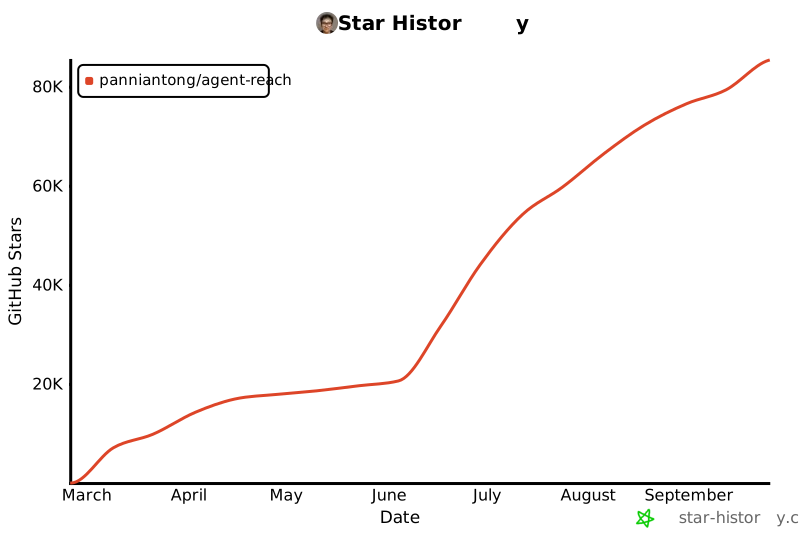
## Star History
[](https://star-history.com/#Panniantong/Agent-Reach&Date)